Please follow the steps for Stock Count Adjustment Report
The Stock Count Adjustment Report provides a comprehensive overview of the retailer or B2B customer’s total stock value, considering factors such as supply price, accepted and returned order item quantities, as well as identifying wastage, shelf items, shrinkage, stock return, and missed stock entries. This report not only presents the actual stock quantities but also highlights instances of human error by displaying missing entry amounts. By including data on shelf items, the report aims to help reduce losses effectively.
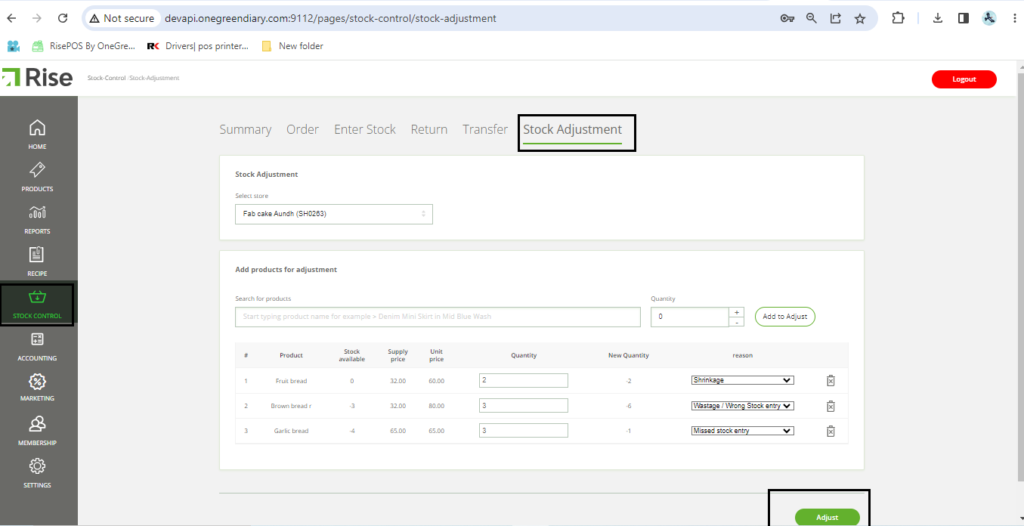
Let’s see how to perform stock adjustment step by step:
- Begin by logging in to the Back Office.
- Go to Stock Control.
- Locate and click on Stock Adjustment.
- Add the items and their respective quantities that need adjustment.
- Choose the reason for the adjustment from the options provided.
1)Shrinkage: Inventory that has been lost, stolen, or unaccounted for in the regular course of business.
2)Wastage: stock is a significant concern for businesses as it directly impacts profitability and operational efficiency.
3)Missed stock entries: can have several negative impacts on a business, including inaccurate stock levels, difficulties in fulfilling customer orders, and potential financial discrepancies. - Finally, click on the “Adjust” button to complete the process.
Please follow the below steps :
- Log in to the Back Office.
- From the left menu, navigate to ‘Reports.’
- Choose the ‘Inventory’ tab.
- Set the ‘Report Type’ to ‘STOCK COUNT ADJUSTMENT REPORT.’
- Select the desired store and category.
- Click on the ‘Submit’ button.
- Finally, click on ‘Export to File’ to save the report.

Export File :
