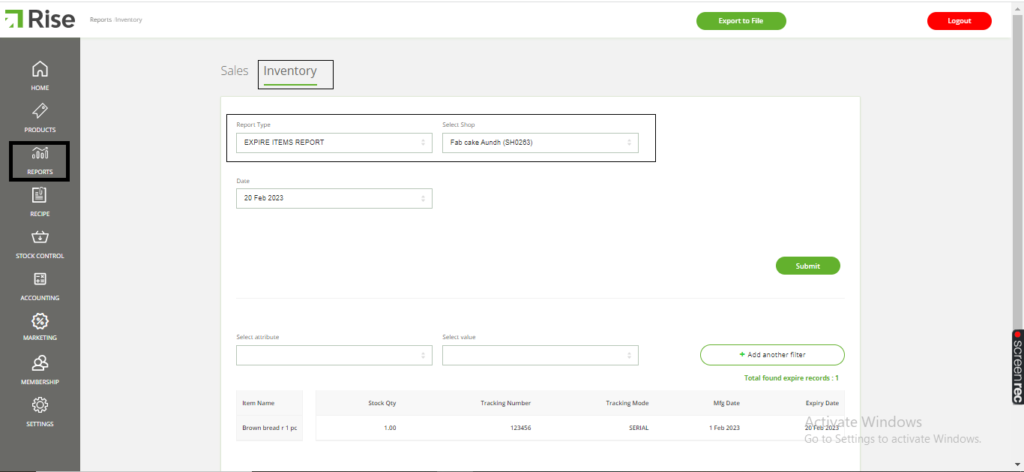
An effective way to minimize losses in the food industry, where the sale of perishable goods is common, is to utilize an expiry report. This report provides valuable insights into which batches or products are approaching their expiration date, enabling you to plan your sales or discounts accordingly. By doing so, you can ensure that products are sold before they expire, reducing the risk of financial loss.
To get started, access the Back Office and select Stock Control. Input the necessary stock details, including the store, supplier, item specifics, quantity, manufacturing, and expiry dates. Once you have received the items, you can generate an Expire Items Report by accessing the Reports section and selecting “Expire Items Report” under the Inventory category. From there, select the store and date and submit the report.
Here are the detailed steps:
Step 1: Go to the Back Office and select Stock Control.
Step 2: Enter the stock details, such as the store, supplier, item specifics, quantity, manufacturing, and expiry dates.
Step 3: Click on “Add to Receive” and receive the items.
Step 4: Access the Reports section and select “Expire Items Report” under the Inventory category.
Step 5: Choose the store and date for the report and submit it.
Note: Please keep in mind that this report provides information on items that are set to expire on a specific day.